Investment Property Calculator
Put two properties side by side and see which one wins on cap rate, cash flow, return and risk measures.
Free · runs in your browser · nothing is uploaded
How to use the investment property comparison calculator
- Read the example values first. Property A and property B are examples that show how the tool works. They are not market data.
- Enter the Purchase price of each property.
- Enter the Down payment and the Interest rate for each property.
- Enter the Monthly rent and the Vacancy for each property.
- Enter the Property tax per year and the Insurance per year for each property.
- Enter the Maintenance (% of rent) and the Property management (% of collected rent) for each property.
- Read the Side by side table. The star marks the better property on each row.
- Read the headline, which counts how many measures each property leads.
- Check the note on assumptions. Both properties use the same loan term, closing costs, capital expenses and hold period.
- Open the full deal analyzer on the winner to change those assumptions and see more detail.
The results update live as you type. Reset to examples restores the example values, Copy summary copies the figures, Download CSV saves them as a spreadsheet file, and Print or save as PDF prints the page. The page address holds your inputs, so a link you send recreates the same comparison.
Change one input at a time to see which result moves. The address bar keeps your inputs, so you can bookmark or share a scenario. Reset to examples restores the example values.
How do you compare two deals fairly?
Use the same assumptions for both. The page does this for you: both properties use a 30-year loan, 2% closing costs, 5% capital expenses and a 10-year hold. Differences then come from the inputs you changed, the purchase price, rent and property tax. If one deal used a different loan term, the comparison would show the loan rather than the property, so keep the terms the same.
What does each measure tell you?
- Cap rate shows the quality of the property, before financing.
- Cash-on-cash return shows the return on the cash you put in.
- Cash flow per month shows what is left each month after the loan.
- DSCR and break-even occupancy show risk. DSCR is how many times income covers the loan payment. Break-even occupancy is the share of rent you must collect to cover costs.
- IRR shows the total return, including the sale at the end of the hold.
- Equity multiple shows how much cash comes back for each dollar invested.
Which property wins on which measure?
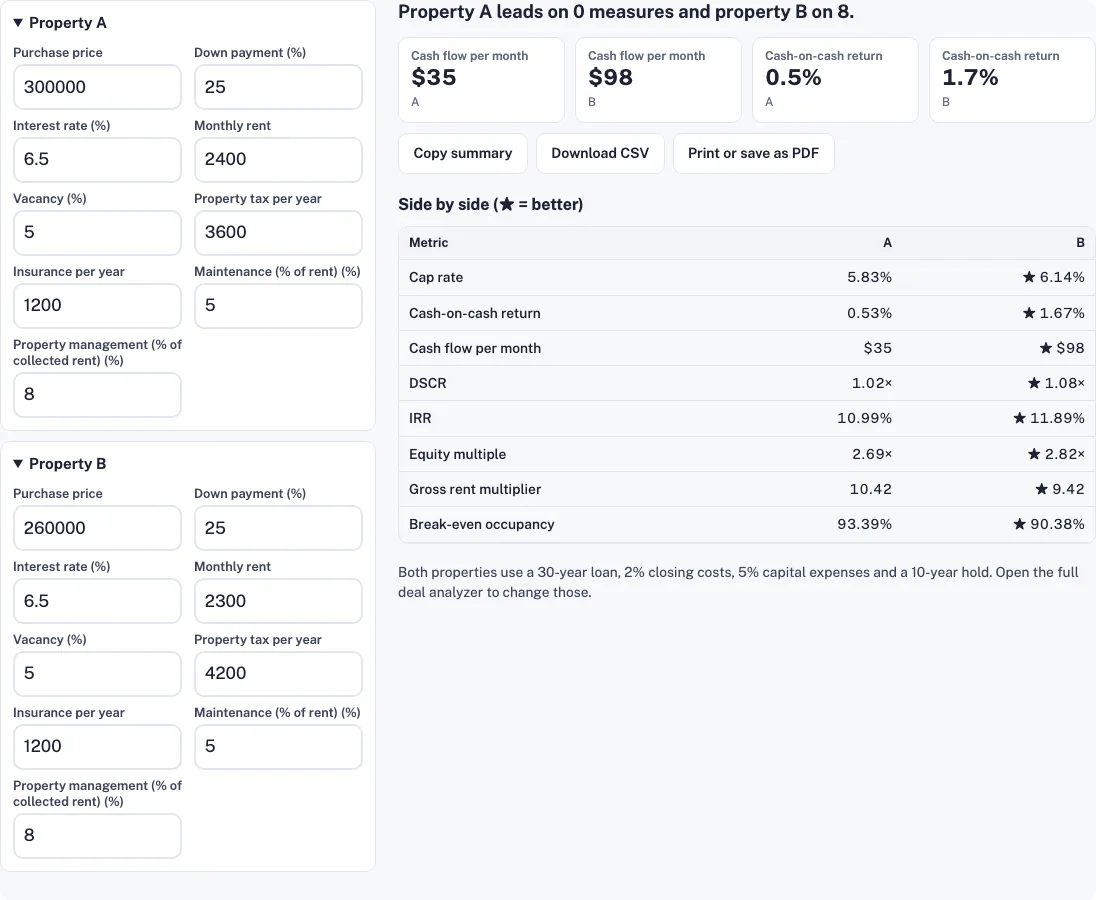
The table uses the default inputs. The star marks the better property on each row. Property B is cheaper, at $260,000, and has $100 less rent a month, at $2,300, but it wins on all eight measures.
| Metric | A | B |
|---|---|---|
| Cap rate | 5.83% | ★ 6.14% |
| Cash-on-cash return | 0.53% | ★ 1.67% |
| Cash flow per month | $35 | ★ $98 |
| DSCR | 1.02× | ★ 1.08× |
| IRR | 10.99% | ★ 11.89% |
| Equity multiple | 2.69× | ★ 2.82× |
| Gross rent multiplier | 10.42 | ★ 9.42 |
| Break-even occupancy | 93.39% | ★ 90.38% |
Property A has $300,000 price and $2,400 rent. The loan is $225,000 on a 25% down payment of $75,000. Property B has $260,000 price and $2,300 rent. Its loan is $195,000 on a $65,000 down payment. B’s lower price means a smaller loan, and its cash flow of $98 a month beats A’s $35. B’s property tax is $4,200 a year against A’s $3,600, so the cheaper deal still carries a higher tax bill.
Why can a winner on one measure lose on another?
Cap rate ignores financing, so it measures the property. Cash-on-cash and cash flow include the loan, so they measure the deal you finance. A property can lead on cap rate and trail on cash flow when its loan is large. Here B wins every row, so the table shows one pattern. The same method shows a split when the numbers split, so read every row before you choose.
What should you check besides the numbers?
- The condition of the property and the work it will need.
- The location and the rent that similar homes get nearby.
- Tenant demand, such as how quickly units let in the area.
- Local property tax and insurance, which differ by place and can change over time.
Are the 7% and 2% rules useful here?
Some investors use the 7% and 2% rules as quick screens. This page does not apply them. The table above gives the measures it does use, and each one shows the result for both properties.
How do you use the full analyzer on the winner?
Take the property that wins most measures into the full deal analyzer. Enter its real price, rent, costs and loan. Then check the cap rate, cash flow and IRR under those assumptions before deciding.
Frequently asked questions
What is the 7% rule for investment property?
This page does not use the 7% rule, so it does not give a result for it. Use the eight measures in the table to compare the two deals instead, since both are judged the same way on identical assumptions.
How much will $100,000 invested be worth in 20 years?
The calculator does not project the growth of cash. It shows IRR and the equity multiple over a 10-year hold for each property. Those results depend on the inputs you enter.
What is the 2% rule for investment property?
The 2% rule is a rent screen. Monthly rent should be at least 2% of the price. It is a rough test, so compare it with the measures in the table. A property that fails it can still pass the measures above, so do not treat it as a decision rule on its own.
How much do I need to invest to make $1,000,000?
No input or result here projects a total of $1,000,000. For these two deals, the cash invested is the down payment: $75,000 for A and $65,000 for B. The table shows what each returns on that cash.
What’s a good ROI for a rental property?
This page sets no target, and no figure here marks a deal as good. Compare the IRR and cash-on-cash return of each property with the return you need, which depends on your risk and your loan. The star marks the better property on each measure, not a guaranteed return.
Related tools
- rental property calculator: use it to run the winner in detail.
- cap rate calculator: use it for the unlevered comparison.
- DSCR calculator: use it for lender coverage.
- cash on cash return calculator: use it for cash returns.
- rental ROI calculator: use it for the return breakdown.
- BRRRR calculator: use it if one of the properties needs a rehab.