Cash on Cash Return Calculator
See first-year cash flow as a return on the cash you invest, and how the rate and down payment move it.
Free · runs in your browser · nothing is uploaded
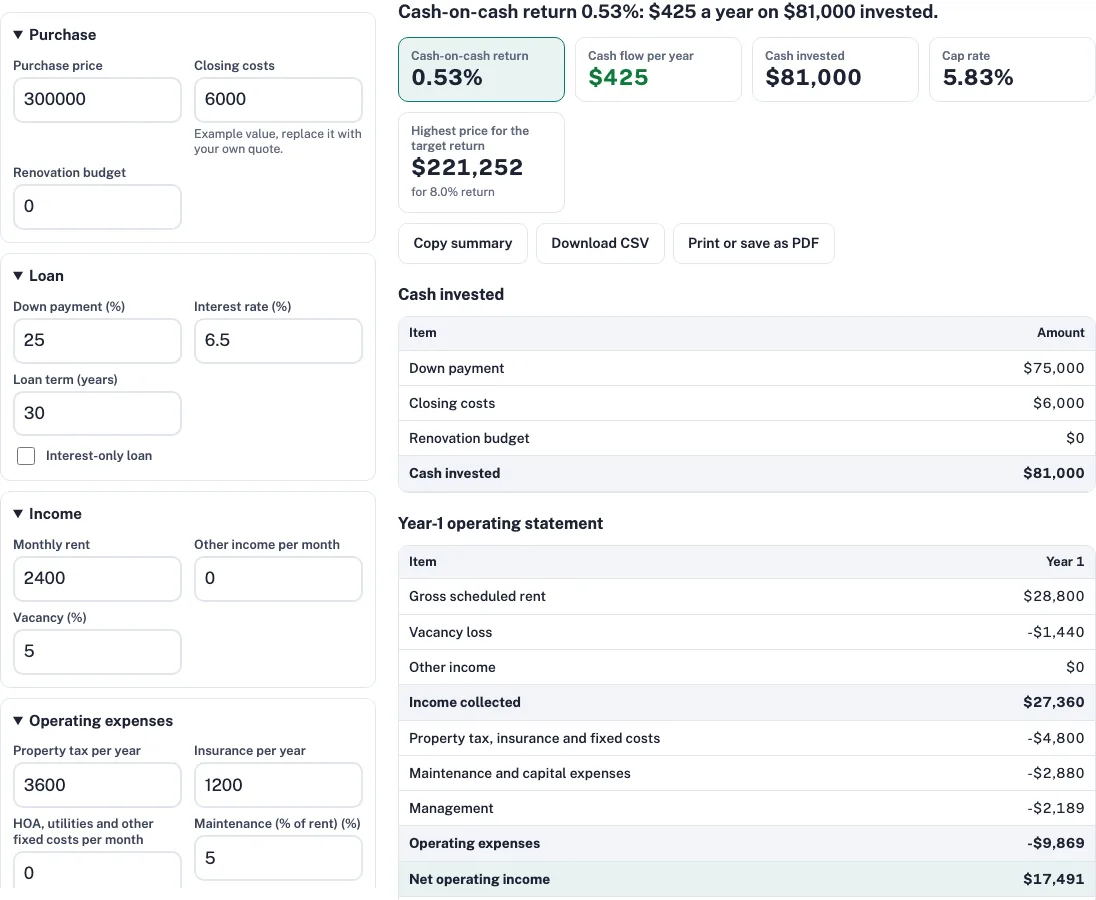
How to use the cash on cash return calculator
- Enter the Purchase price and the Closing costs you expect at purchase.
- Enter a Renovation budget only if you plan work before renting. Otherwise leave it at 0.
- Set the Down payment as a percentage, then enter the Interest rate and Loan term (years) from your loan quote.
- Set Interest-only loan to yes only if the loan is interest-only.
- Enter Monthly rent, Other income per month and Vacancy (the share of rent you expect to lose).
- Enter Property tax per year and Insurance per year, plus HOA, utilities and other fixed costs per month.
- Set Maintenance (% of rent), Capital expenses (% of rent) and Property management (% of collected rent).
- Enter your Target cash-on-cash return to see the highest price that reaches it.
- Read the cash invested table, the year-1 operating statement and the cash-on-cash return.
The return updates as you type. Reset to examples puts back the default numbers, and Copy summary, Download CSV and Print or save as PDF give you the result in other forms. The page address holds your inputs, so a link you share recreates the same result.
Change one input at a time to see which result moves. The address bar keeps your inputs, so you can bookmark or share a scenario. Reset to examples restores the example values.
What is the cash on cash return formula?
Cash on cash return equals annual pre-tax cash flow divided by total cash invested. In the example, cash flow is $425 a year and cash invested is $81,000, so $425 ÷ $81,000 is 0.52%. The tool shows 0.53% because it calculates from unrounded figures. Pre-tax means income tax is not deducted.
What counts as cash invested?
Cash invested is the money you pay out of pocket: the down payment, the closing costs and the renovation budget. The loan itself is not counted. In the example, 25% of $300,000 is $75,000, and adding $6,000 of closing costs gives $81,000.
| Item | Amount |
|---|---|
| Down payment | $75,000 |
| Closing costs | $6,000 |
| Renovation budget | $0 |
| Cash invested | $81,000 |
Cash-on-cash return by interest rate and down payment
Each row is an interest rate and each column is a down payment. Read across a row to see the effect of more borrowing, and down a column to see the effect of the rate. At 25% down, a 4% rate gives 5.7% and an 8% rate gives -2.9%. At 6%, moving the down payment from 10% to 40% lifts the return from -5.4% to 3.6%.
| Interest rate | Down payment 10% | Down payment 20% | Down payment 25% | Down payment 30% | Down payment 40% |
|---|---|---|---|---|---|
| 4% | 5.6% | 5.7% | 5.7% | 5.7% | 5.7% |
| 5% | 0.3% | 3.1% | 3.7% | 4.1% | 4.7% |
| 6% | -5.4% | 0.3% | 1.6% | 2.5% | 3.6% |
| 7% | -11.3% | -2.5% | -0.6% | 0.8% | 2.5% |
| 8% | -17.5% | -5.5% | -2.9% | -1.0% | 1.3% |
Borrowing helps only when the loan costs less than the property earns before financing. The example cap rate is 5.83%, and the default interest rate of 6.5% is higher than that. At this price the loan costs more than the property earns before financing, so more borrowing pulls the return down. Change the Interest rate to see the point where more borrowing stops helping.
How is cash on cash different from cap rate and ROI?
The cap rate is NOI divided by price: $17,491 ÷ $300,000 = 5.83%. It ignores the loan, so it does not show your return on cash. Cash on cash counts the loan payments but ignores principal paydown and appreciation. To add those, use the rental ROI calculator.
What is a good cash on cash return?
It depends on risk, leverage and what else your cash could earn. This tool cannot judge that for you. Start with the return of a lower-risk option you could hold, then ask how much more you need for the work, vacancy and loan risk of a rental. Set your target above that level, and use the highest price result to see which price meets it.
What is the highest price for a target return?
With Target cash-on-cash return set to 8.0, the highest price is $221,252. That is about 26% below the $300,000 example, so the target needs a much lower price, higher rent or a cheaper loan. Enter a different target to see the price that meets it.
Frequently asked questions
Frequently asked questions
How do I calculate a cash-on-cash return?
Divide the yearly pre-tax cash flow by the total cash invested. In the example, $425 ÷ $81,000 is about 0.5%, and the tool shows 0.53% from unrounded figures.
Is a 7% cash-on-cash return good?
It depends on the risk you take and the return on a safer option you could hold. A 7% return can suit one investor and not another. Check whether it still covers vacancy, repairs and a higher rate.
Is a 10% cash-on-cash return good?
A 10% target is a higher bar and usually needs a lower price, higher rent or a different loan. No cell in the interest rate table above reaches 6%, so you would need to change inputs to get there.
Is 12% cash-on-cash return good?
A 12% target is a high bar, and it only makes sense if the extra return pays for the extra risk. Use the highest price result to find the price that meets your target with the other inputs you enter.
What is the difference between cash on cash return and ROI?
Cash on cash return divides one year’s pre-tax cash flow by the cash you invested, and it leaves out principal paydown and appreciation. The rental ROI calculator adds those. In the example, the return is 0.53% on $81,000 invested.
Can I save or share a result?
Yes. Copy summary puts a text summary and the page link on your clipboard, Download CSV saves the tables as a spreadsheet file, and Print or save as PDF gives a printed copy. The page address also holds your inputs, so the link reopens the same scenario.
Related tools
- cap rate calculator: use it for the return before financing.
- rental ROI calculator: use it to add principal paydown and appreciation.
- DSCR calculator: use it to check loan coverage.
- rental property calculator: use it for year-by-year projections.
- BRRRR calculator: use it when cash is recycled by refinancing.
- rental income calculator: use it for monthly cash flow.